
02:58:49 from now
Controlled publishing · 3 releases a dayBlog automation.
Blog automation.
Your editorial control.
Create AI-assisted articles, review your content, and schedule posts to WordPress. Connect Pinterest to prepare and approve Pins—all from one publishing workspace.
- Travel
- Food
- Legal
- Education
- Technology
WORKSPACE
4 reviewed · 3 draft
Resets Monday 00:00
- Destination field guideTravel · WordPressPublished
- Legal education briefLegal · WordPressReviewed
- Local food storyFood · WordPressReserved
Autopubly sits between the tools you already pay for and the sites you already own.
- Generate withChatGPTGeminiYour provider key. Your spend cap.
- Publish toWordPressYour domain. Your schedule.
- Distribute viaPinterestYour accounts. Your boards.
THE QUICK STARTYour first campaign.
Your first campaign.
One clear walkthrough.
See where to start, connect your sites, and find your publishing window. Follow along at your own pace.
Watch the tutorial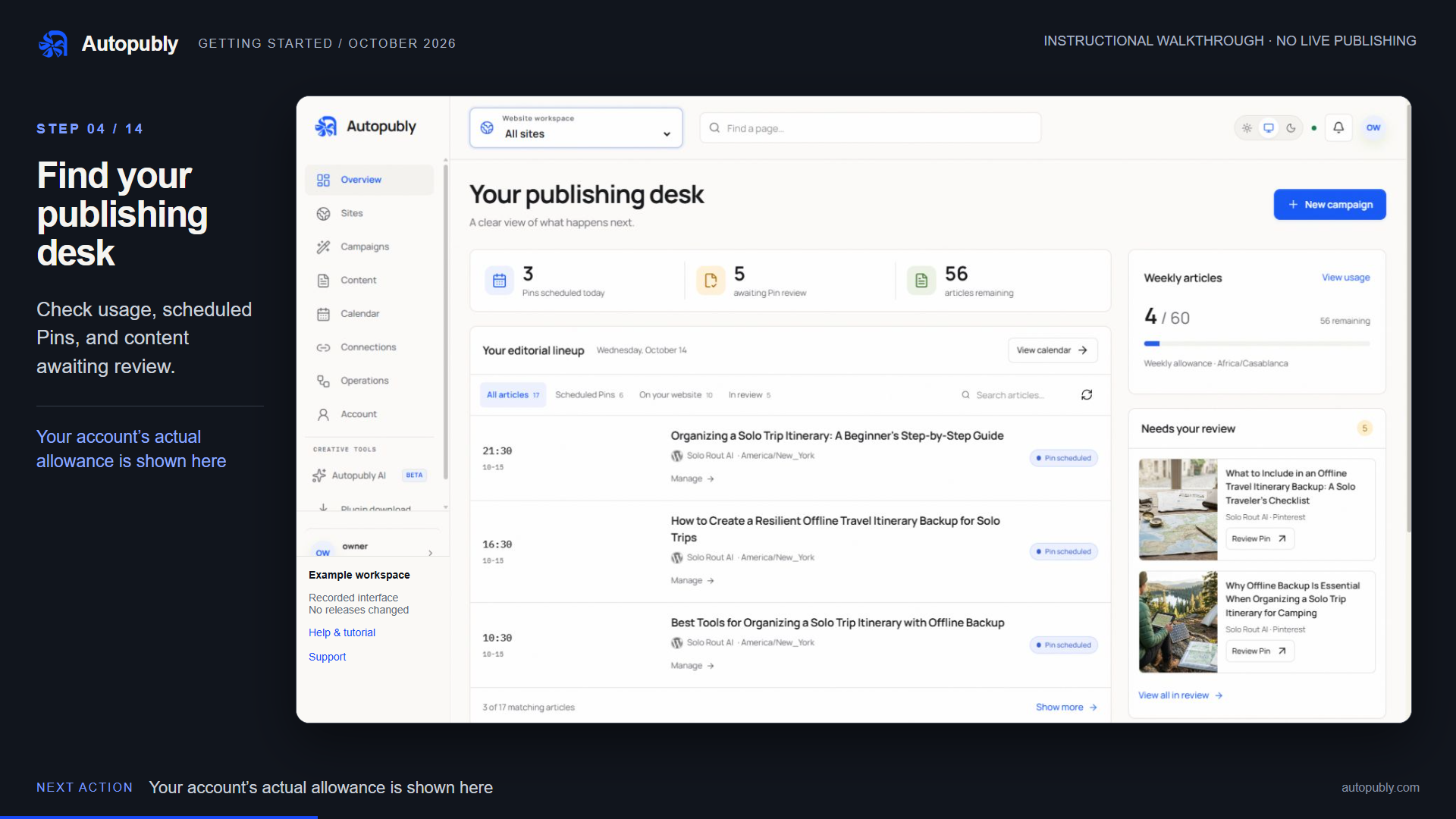 GETTING STARTED 2:57
A publishing system,
not another pile of tools.
Everything below is enforced by the system itself — not a setting you have to remember.
One workspace
Sites, campaigns, queues and failures share a single operating view instead of scattering across provider tabs.
Isolated sites
Every site keeps its own credentials, schedule, niche and provider setup. Nothing crosses between them.
Paced releases
Three spaced publishing windows a day per site. A hundred queued items never become a hundred same-day posts.
Review and release controls
Review generated work in your workspace. Automatic publishing follows your campaign settings and connected platform permissions.
Weekly ceilings
Article, image and provider-spend allowances are reserved inside the same transaction as the job, so parallel requests cannot race past the limit.
Honest recovery
A failed handoff stays visible with the steps to fix it, rather than disappearing into a log.
An idea becomes a story.
You decide what happens next.
Create for WordPress. Review for Pinterest. Give every story a clear path from the first brief to its publishing window.
THE PUBLISHING PATHTry the workflow · nothing is published
THE WORKFLOW / 01Your site · your topics · your limits
Start with a direction.
Choose your site, topics and how much to create. Your campaign gives every article a clear starting point.
THE NEXT STORY
A slower way to see the coast
A thoughtful travel guide, from the first idea to a planned release.
ArticleVisualsSEO
A place in your publishing queueWordPress
WordPressYour websitePinterestReview Pin → schedule
Example article · your actual dates and content stay in your workspaceStep 1 of 5 · Campaign
Built for the way you publish
The workflow and the safeguards are identical on every plan. What changes is how much ground you are covering.
Keep a single site genuinely active
A steady weekly cadence on one domain, with every draft reviewable before it goes near the live site.
- 1 website
- 7 articles a week
- Three release windows a day
Run separate publications side by side
Each site keeps its own credentials, timezone, niche and schedule. Work on one can never reach another.
- 5 websites
- 21 articles a week
- Parallel generation
Operate a whole estate from one console
One queue, one usage ledger and one failure view across every property you publish to.
- 20 websites
- 60 articles a week
- Largest queue and concurrency
Publish where you already write
Connect a destination once. Autopubly holds the credentials per site and hands work over on schedule — and tells you plainly when a handover fails.
WordPressScheduled publishing to your own domain, using application passwords.
PinterestBoard distribution for published work, queued rather than dumped.
AI providersGeneration runs against your own provider keys, under a spend ceiling.
YOUR PACE, YOUR PLANStart small.
Start small.
Make it sustainable.
Find the lowest-priced monthly plan that covers your sites and weekly article target. No need to buy more than you need.
See the workflow before you subscribeCheck the current plans
Recommendations use regular monthly prices, not temporary offers. Publishing windows and weekly limits remain in place.Live pricing is not available here yet. We won’t guess your price.
View pricingBefore you hand over a site
What is Autopubly?
Autopubly is AI-assisted blog automation software for creators and businesses managing their own WordPress websites. It brings topic planning, article generation, supporting images, publishing schedules and optional Pinterest distribution into one workspace.
Can I try Autopubly without a card?
Yes. The current free workspace allows up to eight generated articles per week and two connected websites. No card is required and billing does not start automatically. Check the pricing page for current availability and limits.
Does connecting Pinterest automatically post Pins?
No. Connect through Pinterest’s official authorization page, choose your own board, then review and approve each Pin before scheduling. Pinterest publishing is separate from WordPress article delivery.
Will automated articles guarantee Google rankings or traffic?
No. You remain responsible for accuracy, originality, permissions and usefulness. Review AI-assisted content, add your own experience and check important claims. Neither Autopubly nor a publishing schedule guarantees indexing, rankings, traffic or AI-search recommendations.
Does it publish without me seeing the work first?
It can when automatic publishing is enabled. Check your campaign settings before starting. You can review generated articles in the workspace and pause publishing; review requirements depend on the selected workflow and connected platform.
How fast will it post?
Up to three WordPress releases per site per day, using the configured publishing windows and site timezone. Check Calendar for the actual dates and times. Generating an article is separate from scheduling or publishing it.
Whose AI keys does it use?
Yours. Generation runs against your configured provider, and every call is written to a usage ledger that enforces a weekly spend ceiling before the request is made.
What happens when a site fails to accept a post?
The job stays visible as a failure with the steps to recover it. Nothing is silently dropped, and retrying will not create a duplicate — publishing checks for existing content first.
Can I run unrelated sites from one account?
Yes. Each site is isolated: separate credentials, schedule, context and release rhythm. That isolation is the point of the product.
Ready when you are
Start with one site.
Connect a destination, set the rhythm, keep every release visible.
- 3 releases a dayPaced per site, never a flood
- Account-scopedCredentials never cross sites
- ReviewableRelease follows your settings